I built my own Steam Machine from an affordable mini PC – and have barely turned on my PS5 Pro since
It's remarkably simple to build a PC console capable of playing Cyberpunk 2077 and more


Having recently built my dream retro games console from a mini PC, I decided to up my ambitions somewhat for the next project and tackle something else I'd planned for a month or so.
Considering the rumours of Valve's Steam Machine being delayed due to the ongoing RAM and storage shortages – and a possible hike in price – I had decided to build my own Steam Machine-alike console. Keeping it as affordable as possible in the process.
I wanted a neat, home console to complement the Lenovo Legion Go S Z1 Extreme I bought last Black Friday. A HDMI dock works fine with the SteamOS version of the handheld, but it's not particularly elegant for a living room experience.
I've also been having issues getting 5.1 sound out of the Lenovo through a dock (which is something others have struggled with too), so I thought a separate solution could work better.
And, because both the handheld and console would run on SteamOS, I could share save files between them (via Steam's cloud saves). That way, no matter where I was, I would be able to pick up and play my games from where I left off.
That's partly why I decided a regular Windows PC wouldn't do as a dedicated home console, that and the faff of waiting for Windows to boot before loading into Steam Big Picture. Oh, and don't get me started on having to input my PIN each time I switched the machine on.
All I needed then was a highly capable mini PC, and a reasonably priced one at that.

Choosing the Geekom A7 Max
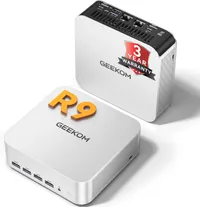
That's where the Geekom A7 Max came in. It's a Ryzen 9 PC in a small aluminium case, with decent cooling and a cheap enough price point (under £600 in recent sales). I had been sent one for review (which this is, of sorts) and while I was a little concerned that its 16GB of DDR5 (5600MHz) RAM was a single-stick solution, it ticked the rest of the right boxes.
Admittedly, it comes with Windows 11 Pro from the box and is primarily designed for creativity and productivity, as a Mac mini alternative, but with a powerful AMD chipset, it is perfectly compatible with Bazzite, too.
That's a third-party Linux fork of SteamOS that enables desktop computers to work like a Steam Deck (or Legion Go S), and is therefore the perfect operating system for this build.
It might not be everyone's cup of tea, as it effectively eliminates any chance of using the A7 Max with Photoshop or Premiere (both of which run superbly as is), but it does make the mini PC a games-focused Steam Machine alternative.
The only additional thing I decided – after running some initial 3D benchmark tests on Windows – is to up the amount of RAM to 32GB. By including an additional 16GB of DDR5 (5600MHz), which cost me around £160 extra, I could ensure games ran better.
While the single stick performed capably with everyday and creative tasks, it just wasn't going to give me the results I needed for games. Indeed, in tests before I added the extra RAM, I could just about play the beefier titles at around 1080p at 30 frames per second, or I'd have to radically drop the resolution to 720p or even lower.

By adding the additional 16GB though, there was a significant jump in the A7 Max's gaming performance without having to alter the integrated graphics or CPU – by around 70 - 80%, in fact. That's a massive leap.
The upgrade doesn't matter as much if you'll mostly play lighter indie games, such as Megabonk and Dave the Diver. Or if you plan to use the Geekom A7 Max as a desktop workhorse, more than a gaming-centric device. But, to get the likes of Cyberpunk 2077 and Dead Island 2 in anything like a playable frame rate at 1080p, you'll need that extra stick of RAM for sure.

Tweaking the Geekom A7 Max
It's also worth noting at this stage that upgrading the Geekom A7 Max is a little tricky. That's thanks to the Wi-Fi 6E antenna(s) being housed on the bottom casing and connected to the motherboard via a couple of thin cables. They can easily work loose if you're not extra careful. But even though I knew this might be fiddly, I still banjaxed myself by accidentally detaching them.

Adding the extra RAM itself was a doddle – it slid straight into the spare slot – but reattaching those darn cables took a while (and a lot of swearing).
It was very much worth it though, considering the boost in performance. And if you manage to keep the cables attached during the process (unlike me), it won't even take that long.
You just have to unscrew the four screws – one under each of the rubber feet – and that's about it. Just be very gentle when you remove the bottom.

One reconstructed, I decided to take additional 3DMark bench tests while I was still running Windows 11 Pro (3DMark doesn't yet support SteamOS), and then it was onto installing Bazzite.
| Header Cell - Column 0 | 16GB DDR5 RAM (single stick) |
32GB DDR5 RAM (2x 16GB sticks) |
Percentage difference |
|---|---|---|---|
Steel Nomad Light |
1,624 |
2,855 |
76% |
Time Spy |
1,936 |
3,363 |
74% |
Solar Bay |
7,169 |
12,919 |
80% |
Why choose Bazzite?
There is currently no dedicated build of SteamOS available for desktop PCs, but Bazzite is a perfect alternative. It provides the full Big Picture experience and plenty of wriggle room for adapting the back end.
You can also install a wide variety of apps and other tools to improve the UI – including EmuDeck to help integrate all of your emulators and classic games, and Heroic Games Launcher to add your GOG, Epic Games Store, and Amazon Prime libraries.
It will wipe the Windows 11 Pro installation from your internal SSD, so it's best to back up the machine first, but the benefit is a more console-like experience that boots straight into Big Picture and gets you up and running with your games much more quickly.
You can install it on an external drive instead, then change bios to boot from there, but it's not really recommended. It doesn't work well from a HDD, and even an external SSD could slow down the process.

I found it was better to install Bazzite on the internal SSD (1TB in this case) and leave the rest of the storage for Steam games (or from your other PC libraries). I then added an external HDD which I used for a selection of classics to emulate.
Thankfully, it's very simple to install and get up and running. You just need to flash the software to a spare USB drive using a PC or Mac, then boot from it on the mini PC. It will guide you through everything else.
For me, the benefits of using Bazzite are ease-of-use and speed. I also believe many games run better, even though the majority are operating through a Linux compatibility layer (generally Proton). For example, I spent a while tweaking Cyberpunk 2077 when running it through Windows on the Geekom A7 Max, but found I got a more stable performance using the Steam front-end.
In terms of capability, with the two sticks of DDR5 RAM running, I managed to get impressive results out of many games – but mostly when playing them at 1080p., maybe even a little lower.
For example, I managed to play the aforementioned Cyberpunk 2077 at 900p with ray traced shadows turned on and with "medium" graphics at around 65 fps. That's with AMD FSR4 set to balanced and FSR frame generation switched on.
It provided a comparable experience to playing it on an Xbox Series X, albeit with the bonus of a higher frame rate and ray traced shadows at the same time.
The resolution takes a hit (in comparison with the Xbox or a PS5), but I'd rather have the smoother play and some ray tracing support. Ditch ray tracing and you can get more fidelity and even higher fps still.
Also, considering the game was a PC killer just a few years ago, it's a miracle it runs on a mini PC with integrated graphics anyway, let alone well.
| Header Cell - Column 0 | Medium settings (average frame rate) |
High settings (average frame rate) |
|---|---|---|
Cyberpunk 2077 (with ray traced shadows) at 900p |
65 |
55 |
Dead Island 2 at 1080p |
58 |
49 |
Shadow of the Tomb Raider at 900p |
56 |
54 |
Dirt 3 at 1080p |
124 |
103 (at Ultra) |
I didn't have many other modern AAA titles to test, but some older big name titles looked stunning. It's probably a given that many of my indie favourites did too, like Hades II and Hollow Knight: Silksong.
Each played at a solid 120 frames per second, although one caveat is that the TV I was using – an older 65-inch Philips OLED – was only capable of 120Hz at 1080p (and 60Hz at 4K). They could have run with even higher frame rates on a gaming monitor, I expect.
I also tested all manner of retro ROMs through the Bazzite build with EmuDeck installed, including PS3 and Nintendo Switch. And most were more than happy to run in 60fps, including Infamous and Mario Kart 8 Deluxe. Even trickier titles, like Bayonetta 3, ran well.
Basically, if you're happy to make some graphical concessions and max out at 1080p, the Geekom A7 Max can be a very capable games machine. But only if you add that additional RAM.

Plenty of connections
Also handy were the swathe of connections on offer. The Geekom A7 Max offers a suite of in/outputs, including five USB-A 3.2 Gen 2 ports on the front, two USB-C 4.0 ports, a USB-A 2.0, two HDMI 2.0 outs, a 3.5mm headphone jack, two 2.5Gbps Ethernet ports, and an SD card slot. There's also a Kensington Lock for security.
There's Wi-Fi 6E and Bluetooth on board too.

It's an impressive array for a relatively small device, although there is one caveat to its form factor – the internal fan can get a little overenthusiastic at times.
The A7 Max has a base TDP of 356W but is actually capable of raising to 54W when it needs. It'll adapt automatically (there's no obvious way of setting it manually in bios), so you will often hear the fan whirring around while playing a game. In fact, most tasks are met by some fan noise – but it does get louder with some of the more intensive titles.

This can't really be helped considering the compact size of the mini PC and in all honesty it doesn't sound that bad when you get used to it. Just don't expect PS5 or Xbox Series X levels, more PS4 Pro.
Other than that, with Bazzite fully up and running (and tweaked through app add-ons), and my favourite PC controller wirelessly connected via its dock (the 8BitDo Ultimate 2) I can honestly say I achieved the goal I set myself. And the Geekom rose to the challenge.

In conclusion
Of course, although we're not yet sure of the final specifications for Valve's official Steam Machine, it's highly likely that it'll be more powerful than the one I built. And I might not have actually saved much money either, considering I added the extra 16GB of RAM at a time when prices are at an all-time high.
But the big advantage of this project is that it proves the convenience of a Steam Machine is already possible. And a living room-friendly mini PC makes for an ideal 1080p games console.
There are even beefier models out there with extra graphical prowess if you want to spend a bit more. But for me, the Geekom A7 Max – with a little additional coaxing – proved an ideal gaming option.
So much so, in fact, that I've barely even played on my PS5 Pro since completing the build. I've been too busy catching up with my Steam library on the big screen. Well, until I think of another project I can get my teeth into, anyway.
