Xbox 360 SmartGlass preview
It's the Microsoft app that plays nice with iOS and Android too...
Why you can trust T3 Our expert reviewers spend hours testing and comparing products and services so you can choose the best for you. Find out more about how we test.



Announced at Microsoft's E3 2012 press conference, we get a demo of the Xbox SmartGlass app that brings devices closer together
There once was a time when the Xbox was simply about slipping Halo into the disc tray and sinking into the sofa for a session of space galactic shooter action. These days however, there is more to Microsoft's console than gaming.
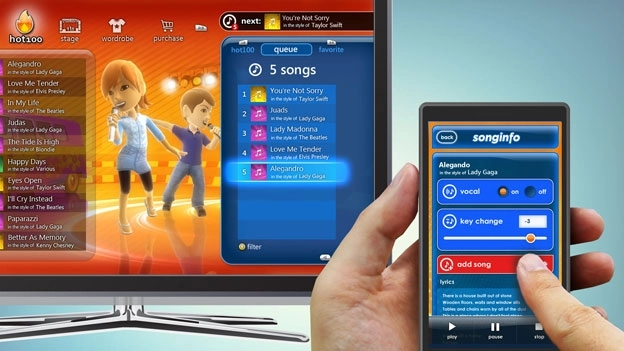
With the unveiling of the Xbox 360 SmartGlass app, Microsoft now offers the ability to transfer television shows, films and music to your Xbox 360 via PC, tablet or smartphone plus offer additional content to enrich your viewing or listening experience.

Apple AirPlay and Samsung All Share already do a great job of .bringing devices you already own closer together, but as Microsoft gave us a preview of the Xbox SmartGlass app in action this could well be the next step to connecting TVs, smartphones and tablets.
Xbox 360 SmartGlass: Design
Using a Windows 8 tablet and Windows Phone 7 smartphone to run the free SmartGlass app, on the setup front users will also need to sign into an Xbox LIVE account and of course have an Xbox 360 hooked up to a TV. Microsoft eluded to the fact that the functionality might only be offer to Xbox LIVE Gold members, but we are awaiting confirmation if that will be the case. The app is able to support up to four devices using SmartGlass for an Xbox 360 console all in one room.
Xbox 360 SmartGlass: Features
Up first was an episode of Game of Thrones running on the Windows 8 tablet where we were shown how the press of a simple virtual button can instantly beam the content from its current position to your TV and vice versa to continue watching. There is also the ability to generate additional content on the tablet such as family tree information closely tied into the show as you continue watching on the TV.
We were shown the film School of Rock next and the potential to deliver real-time information with a SmartGlass feature that presents cast information for every actor in the exact scene that you are watching. As soon as an actor or actress leaves the scene, so does the information from the tablet. Microsoft also showed off the ability to search for specific actors and other films they have appeared in and with existing subscriptions to the likes of Netflix and Lovefilm open up the film to watch instantly.
The SmartGlass app will also have a place in the Xbox 360 gaming realms. Following on from the Halo 4 and Madden 13 concept demos at the Microsoft press conference, we checked out a demo of the game Ascend. As the game ran on the television, we were able to view maps on a Windows Phone 7 smartphnone in real-time. We were also told about a baseball game with the working title Homerun Stars which will allow someone to pitch or bat using Kinect while the other person uses the SmartGlass app.
Xbox 360 SmartGlass: Verdict
With the likes of Paramount and EA already showing impressive ways to integrate the SmartGlass app, it is clear that it has great potential and the backing of some high profile names in the gaming and entertainment business. Absorbing what Microsoft has already achieved with the Windows Phone Companion app, this clearly takes the Xbox 360 integration much further.
It delivers a second screen experience that is almost Wii U-like with the crucial difference being that it uses devices you already own. It is also likely to be out before the new Nintendo console hits the shelves. SmartGlass could well be our glimpse into the future of Xbox and how we can expect to interact with Microsoft's next generation console.
The Xbox 360 SmartGlass app is free and will be available for Windows 8 tablets, Windows Phone 7 smartphones and crucially, iOS and Android devices.
