HoverAir Aqua review: A floating camera drone that finally makes flying over water safe
HoverAir’s watery follow-me drone is making quite a splash on the drone market, but it’s not as cheap as you may think


The HoverAir Aqua is a genuinely unique drone, combining waterproof construction with excellent autonomous tracking on both water and land. Whether you're kayaking, paddleboarding, surfing, or hydrofoiling, this personal aerial camera buddy reliably follows and films your adventures with minimal effort. However, the premium price tag means it's best suited to water sport enthusiasts, serious content creators and well-heeled boat owners.
-
+
Waterproof and unsinkable
-
+
Amazing wind resistance
-
+
34mph top speed
-
+
Very good close-up image quality
-
+
Easy to use
-
+
Lots of amazing follow-me flight modes
-
-
Too large for a pocket
-
-
Noisy
-
-
Some irritating transmission dropouts
-
-
No bag included
-
-
Expensive
Why you can trust T3 Our expert reviewers spend hours testing and comparing products and services so you can choose the best for you. Find out more about how we test.

Drone pilots have been crying out for a drone that can be safely used on water without a chance of it sinking, and here it is, the new HoverAir Aqua in all its Day-Glo orange glory.
HoverAir has spent the past few years carving out a niche for itself with a small raft of compact, self-flying camera drones that prioritise simplicity, safety and automatic subject tracking over traditional piloting.
With the Aqua, however, the Chinese company has taken a leap and created the world's first consumer-priced waterproof flying camera designed to operate where most drones fear to tread – over lakes, seas, rivers, ponds, swamps, and swimming pools.
It's a concept that makes perfect sense given how many outdoor adventures take place on and around water, but the catch may be the price, which is higher than you might expect for a small personal follow-me drone.
Do the Aqua’s unique capabilities justify the significant investment of £1,129? In this day and age, not really, but it's still a darn fine opening salvo that works an absolute treat for those who can afford it. Let's get it on.
HoverAir Aqua review
Price and availability
The HoverAir Aqua is available now in the UK, where it can be purchased directly from HoverAir and other online stores like Amazon and Jessops.
Prices start at £1,129 for the Standard bundle, which includes the drone, Lighthouse tracking device and essential accessories. It is also widely available throughout Europe, where the Standard bundle retails at €1,299.
While this waterproof drone has officially launched globally, HoverAir has reportedly paused accepting US orders due to regulatory complexities and the FCC's ban on certain foreign drone brands.
Specifications

- Weight: 249g
- Dimensions: 20.19 × 20.59 × 6.25 cm (L×W×H)
- Max speed: Normal 34mph (55kmh)
- Max flight time: 23 mins
- Max flight distance: On water: 100-300m; On land: 500m (with phone); 1km with beacon
- Wind resistance: Level 7 (33 knots/38mph)
- Camera sensors: 1/1.28-Inch square CMOS
- Lens format equivalent: 24mm
- Max aperture: f/2.55
- FOV: 85˚
- Max video resolution: Horizontal: 4K + 1080p up to 100fps; Vertical: 4K up to 30fps
- Video modes: Standard, 10-bit H-Log, Slow-Mo, Vertical
- Max image resolution: 12MP (JPEG)
- Image stabilisation: Single axis mechanical + digital with horizon levelling
- Onboard Storage: 128GB
- MicroSD card slot: No
- Battery charging time: 52 mins
- Waterproof: IP67
Available combinations

The HoverAir Aqua is available in three main package configurations, allowing buyers to choose a bundle that matches their budget and intended use.
The Standard Bundle retails at £1,129 and includes the drone, waterproof Lighthouse controller, a single battery, a USB-C cable, a repair kit and a waterproof battery bag.
Stepping up a notch, the Fly More Bundle (£1,299) is designed for longer adventures and adds two extra smart batteries, extra waterproof battery bags and a charging hub.
Finally, at the top of the range sits the Land and Sea Bundle. This comprehensive package includes all of the Fly More accessories plus the Beacon and Joysticks control system, magnetic mounting accessories and a take-off/landing pad.
Design and build quality

I've been harping on for ages about the lack of drones that are able to survive a fall into water without sinking to the bottom like a stone. To my knowledge, only two drones have thus far been capable of flotation in an emergency: the extraordinarily expensive pro-spec SplashDrone and the now-defunct PowerVision Power Egg X.
There have also been many DIY attempts over the years, with users zip-tying polystyrene landing gear to conventional drones, but these have consistently compromised the craft's aerodynamics, especially in windy conditions.
Well, it seems that HoverAir has beaten DJI to the punch once again by closely observing the market and producing the Aqua, a one-of-a-kind drone that can take off and land on water. This is long overdue, since water – specifically salt water – is the number one enemy of any drone and the sole reason so many pilots are reluctant to fly over seas, lakes, and rivers.
The HoverAir Aqua is unlike any other consumer drone currently on the market – an autonomous flying camera with a fully waterproof design that makes it unsinkable. The fact that it's decked out in bright orange is not only a welcome change from the grey norm, but it genuinely makes it much, much easier to see in the air and on the water.
Purpose-built for watersports and other watery outdoor adventures, the Aqua carries an IP67 waterproof rating, which means it's watertight enough to survive submersion to a depth of up to one metre for up to 30 minutes. It also weighs just 249g, so it doesn't require anything beyond the easy-to-attain Flyer and Operator IDs to fly it.

Unlike the company’s land-based HoverAir X1 Pro, the Aqua has been designed as a one-piece fuselage for structural integrity so it cannot be folded.
At 20cm in length, 20.59cm in width and 6.25cm in height, it is far too big for any pocket and for some reason, none of the package configurations includes the official bag for the drone, so you'll have to purchase it separately or transport it as best you can without damaging the camera lens.
The HoverAir Aqua's build quality is excellent throughout with solid assembly and no creaks, flexing panels or obvious weak points. Its main means of flotation is a buoyant outer tube that feels like spongy memory foam under its tough nylon-like wrap. This tube also serves as a collision bumper, so there's very little chance of being injured even if it accidentally flies into you at speed.

The four mini props, meanwhile, are encased in the surrounding flotation tube, with soft plastic guards on top to protect your fingers when you hand-catch the drone from above. Oh, and you'll be very pleased to learn that even the Standard package includes a repair kit comprising a flotation tube, props and prop guards.
Amazingly, the Aqua can hit a top speed of 34 mph (55 km/h), which is easily fast enough to film the most rapid watersports like kiteboarding, sailboarding, and even skiing without leaving the drone behind.
Moreover, the Aqua's wind speed rating is an astonishing Level 7 (33 knots/38mph), one level up from the big DJI Mavic 4 Pro. You also get up to 23 minutes of flight time with this drone, and that's only a few minutes shy of the similarly sized but foldable DJI Flip.
While other follow-me drones use their cameras to track the user without requiring an app or controller, this one is more specialised and aimed at waterborne activities where signals can be easily interrupted.
Hence, the user is required to wear an arm-mounted bright orange transmitter called a Lighthouse so the drone can lock onto its subject and avoid being confused by water reflections, sea spray, or large waves.

One of the HoverAir Aqua's most impressive features is its integrated one-inch colour screen interface, which transforms what could be a complicated setup process into something a lot more straightforward.
The ultra-crisp, high-resolution display is really easy to read in a variety of lighting conditions while providing clear menus, large icons and a logical layout that makes everything easy to navigate.
Aside from essential information like battery status, camera settings, connection status and instant access to its wide range of follow-me flight modes (including their individual flight parameters), the screen interface also lets you watch the videos you've shot on the spot so you can instantly check whether you got something in the can or whether you need to do another take.
A series of very loud and clear voice alerts, meanwhile, keeps the pilot informed every step of the way.
Ways to use the HoverAir Aqua

The HoverAir Aqua has been designed essentially for use on water, though it's just as happy on land. Unlike the HoverAir X1 Pro I reviewed in 2024, which follows the user on land using advanced AI-powered vision-tracking algorithms combined with built-in cameras and sensors, the Aqua predominantly tracks the user by locking onto a wearable, waterproof tracker and control hub called the Lighthouse, which straps around the upper arm.
Instead of relying on camera vision alone, the Aqua uses centimetre-accuracy RTK GPS (Real-Time Kinematic) technology to create a virtual tether between the drone and the Lighthouse, ensuring it stays locked onto the individual even when its line of sight is temporarily blocked by waves or the user is obscured in a crowd.
Given that both the drone and Lighthouse beacon are fully waterproof, any water sport fan can now indulge in their favourite pastime and film themselves while doing it.
In fact, this drone is suitable for a wide range of water sports, whether it's shooting slower activities like paddleboarding and swimming or nippy sports like surfing, kitesurfing, sailboarding, and hydrofoiling. Even skiing is doable if the speed is less than the drone's maximum velocity of 34mph.

The Aqua can be flown in several ways. Obviously, the Lighthouse is far and away the best method when used on water, but you can also fly it using the HoverAir app's virtual joysticks or the optional Beacon controller with physical joysticks.
And if you select the tracking option in the app and draw a box on the screen around a subject, the drone will perform any number of pre-set tracking shots without the need for the Lighthouse beacon. You can read more about this drone's multitude of preset flight modes in the chapter below.
The HoverAir can take off and land from the hand, the ground or water. To use the hand method, hold the drone from above, tap the 'take off' icon on the Lighthouse, the main power button on the drone, or, more awkwardly, the take-off button in the app, and let go once the props start spinning.
To land it, either grab the top of the drone after you've initialised a return to home and flip it over quickly to shut the motors off or simply land it on water or solid land. If using the Lighthouse on water, tapping the landing button will have it return to you and hover nearby for 15 seconds, giving you time to grab it before it initiates an automatic landing sequence.
As an extra rescue bonus, if the drone hits an overhanging tree, sail or other obstacle and crashes into the water upside down, a simple tap of the 'take off' button on the Lighthouse will initiate a turtle flip before the drone lifts off. Very clever.
Another very cool feature when wearing the Lighthouse is the ability to adjust the drone's height, distance, and angle from the subject by tapping the Lighthouse's black directional buttons. This saves having to bring the drone back to you or reach for the app to make these changes.
Camera features

The HoverAir Aqua camera is equipped with a 1/1.28-inch CMOS sensor that supports various resolutions, including 4K and 1080p at up to 100 fps, and vertical 4K at up to 30 fps. Its photo resolution is 12MP.
The lens, meanwhile, boasts a format-equivalent focal length of 24mm, a maximum aperture of f/2.55, and an 85˚ field of view. The user also has a choice of several video modes: Standard, 10-bit H-Log, Slow-Mo and Vertical.
The camera itself is mounted on a single-axis mechanical gimbal with digital image stabilisation and horizon levelling, while a hydrophobic, anti-fog lens coating helps keep the lens clear in wet and humid environments.
For waterproofing, there is no MicroSD card slot on this drone, so it comes with a commendable 128GB of onboard storage, which is more than enough space for any all-day shoot.
Finally, you can copy Aqua’s raw video and photo files in two ways: wirelessly from the drone to a phone or tablet, or directly to a computer via its water-sealed USB-C port.
Unless you're editing footage on your phone or tablet, I would go for the USB desktop route every time. Simply turn the drone on, plug in the supplied USB-C cable, and look for its drive icon on the desktop.
Flight modes


The HoverAir Aqua comes with a banquette of 14 autonomous flight modes, tailored in some instances to specific water sport disciplines. Here's a handy breakdown:
Basic Modes
Follow: Automatically tracks and keeps you in the frame from the front, back or side.
Orbit: Rotates a full 360° around the subject with adjustable radius and speed.
Hover: Stays locked in a stationary position while swivelling to track the user.
Zoom Out: Flies backwards and upward to reveal the surrounding panorama.
Bird's Eye: Flies straight upwards with the camera facing directly down.
Water Modes
Kayak Mode: Optimised for low-profile tracking on rivers and open water.
Paddleboard (SUP) Mode: Tracks your full body and allows for one-handed angle adjustments via the wearable Lighthouse controller.
Surf Mode: Uses high-speed AI tracking (up to 34 mph) to follow and capture fast wave-riding.
Foil Mode: Tuned for wind surfing, sail boarding, hydro-foiling and other fast-moving watersports.
Cinematic Modes
Spiral: Flies upward in a spiral pattern to capture an evolving, dramatic scene.
Dolly Track: Maintains a fixed distance in front of you as you move toward the camera.
Angle Track: Tracks alongside to capture a side-profile view.
360 Spin: The drone spins 360˚ with the camera facing outwards for panoramic captures.
Orbit Follow: Combines circular movements with customisable speed and radius.
Flight and camera performance
I tested the Aqua in a field and also let it loose on a canal, and it flew like a trouper, even when the wind was strong enough to pitch it at a very acute angle. I’m not sure how HoverAir managed to make this light, not-especially-aerodynamic drone so wind-resistant, but hat’s off to them.
I've also been extremely impressed with this drone's ability to track a subject as if following a breadcrumb trail, especially during my land tests.
However, because it is locked to the Lighthouse beacon, which is worn on the upper arm, it does sometimes tend to favour one side more than the other, and you can see this in some of the videos I took at Cropredy’s canal-based kayak racing club.
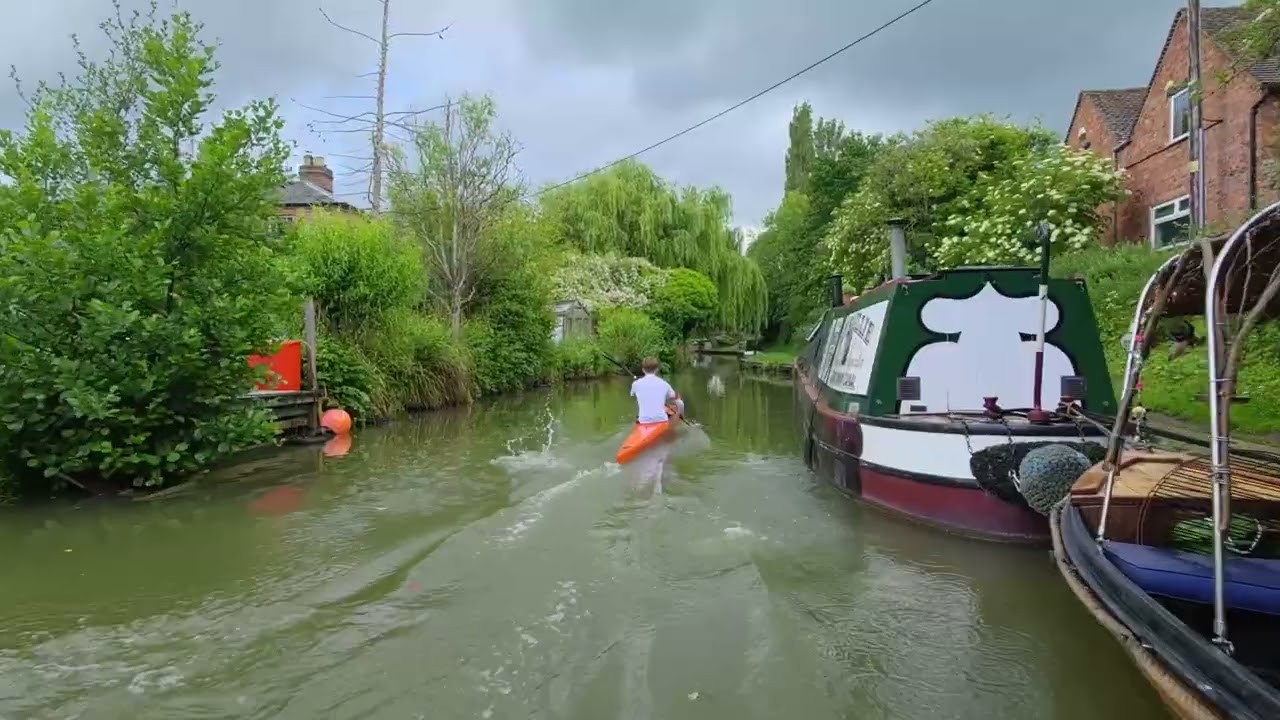
In general, the Aqua mostly chose a central position when using the Kayak mode, but when the canal narrowed, it twice chose the side the beacon was on – the kayaker's right arm.
Since it doesn’t feature obstacle avoidance, the drone crashed into a canal boat on one occasion – remarkably surviving unscathed – and almost came a cropper on the return trip when it flew perilously close to a wall, brushing some overhanging leaves in the process.
It never truly recovered from this last event because it spent the next few seconds desperately trying to keep up with the kayak at racing speed. Its camera, too, seemed to bob up and down as if it were having trouble locking onto its target. But, hey, it missed the canal bridge and produced some fabulous footage in the process.
To be fair, this drone is designed for use in open water where it has space to breathe, but I have to say that I was pretty chuffed it performed as well as it did in a confined area, too.
No camera drone is worth its salt if the resulting footage is below par. From my experience, sharpness and definition tend to fall away the higher a drone flies, and this is most notable when flying over woodland, when everything becomes a wee bit smudgy.
However, when a drone gets much closer to its subject, everything in the frame pops with vastly improved sharpness and definition.
While the Aqua's imagery doesn't quite match the DJI Mini 4 Pro or Mini 5 Pro for overall video quality, I think it's spot-on perfect for close-quarters work from several metres away, which is what it was designed for.
Yes, you may notice some minor visual anomalies here and there on a desktop, but I believe it's more than good enough for tablet and phone use and for social media.
I've also been impressed with the camera's quick focusing, exceptional smoothness from the gimbal and its ability to keep the subject in frame, though I did make sure I had set the drone's distance to either medium or far (if set too close, there's a chance your head may be cut off in the frame). I was also pleased to see that none of the footage was affected by water droplets on the lens.
I guess the only annoying things about the whole experience were the insane noise it makes – especially when flipping it over to turn it off – and the propensity for disconnections and reconnections with the Lighthouse, sometimes within seconds of each other.
Mind, this mostly happened at the beginning of a session and seemed to have no bearing on the safety of the craft. Just as well, because I was getting quite irritated by the loud vocal alerts of 'Lighthouse disconnected, Lighthouse connected'. Perhaps a future firmware update will solve this issue.
Verdict

The new HoverAir Aqua stands apart from every other consumer drone I’ve tested thanks to its waterproof design and ability to operate effortlessly over water, even in a very stiff sea breeze.
Its intelligent armband-tracking technology reliably follows the user while capturing unique waterborne footage that traditional drones would struggle to achieve without falling in and sinking like a brick.
Compact, easy to use and packed with innovative features, this amazing drone offers plenty of appeal for water sport fans and even landlubbers. However, all this innovation comes at a high cost, placing it firmly in the territory of enthusiasts and wealthy boat owners.
