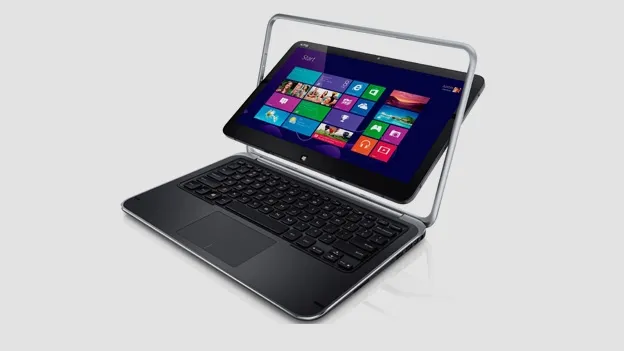
The Dell XPS 12 is a hybrid device blending the boundary between tablets and PCs. But does this Windows 8-toting device deliver?
Dell XPS 12 review
Dell XPS 12 review
T3-
Full Review
Dell XPS 12 review
Love
- Great keyboard
- Impressive screen
- Very powerful
Hate
- Pure weight
- Chunky power supply
It's no secret that Windows 8 hasn't been the desperate boost that PC sales need - in fact, Windows 8 hasn't halted the decline of laptop sales against the furious rise of tablets.
Dell has long been intent on combining the two and the Dell XPS 12 (also known as the Dell XPS Duo 12) has a screen that flips 180 degrees to act as a hefty Windows 8 tablet with a 12-inch screen.
The biggest rival, over a traditional laptop and tablet, is the £699 Lenovo Yoga ultrabook, which features a screen that bends back through 360 degrees rather than the 'spinning within a frame' design of the Dell XPS 12.Dell XPS 12: Size and build
Dell rarely puts a foot wrong with stylish yet sensible build, designed for business and serious home use. Despite the tablet credentials, the Dell XPS 12 is definitely a machine for the home - it weighs over 3lbs which is a barrier that few ultrabooks cross, even if they have larger screens than the 12-inch display here.
There's a lot inside, however, so more on that later. The weight also explains the rugged feel - against Asus and Acer rivals, there's no flimsy compromise anywhere on the body - it feels like a desktop computer compared to a laptop. The keyboard and trackpad are both soft, responsive and very quiet - as perfect a typing system as we've seen on a PC laptop.Dell XPS 12: Features
There's a hefty spec from the start on the high-end model - an i7 processor meets 8GB of RAM and a 256 SSD drive. The £979 entry level model downgrades to an i5 process, 4GB RAM and 128 SSD so it's worth the extra cash for the SSD upgrade alone.
There's a headphone socket, Bluebooth 4.0 and two USB ports but no HDMI out however, which seems a bit 2008 for a modern laptop that is designed for serious business and home office use. There's no optical drive for DVDs or Blu-ray discs.Dell XPS 12: Screen
The 12.5-inch Gorilla Glass True Life WLED display is impressive and sharp and, crucially, touchscreen commands work well and the screen is responsive in PC and tablet mode. The screen may look fragile when flipped but it's a solid frame and is secure once wedged into tablet or PC formation.
Dell XPS 12: Performance
An i7 process and 8GB of RAM means that this is a serious laptop offering MacBook Pro levels of performance especially when paired with 256GB of SSD storage.
Windows 8 may still be a confusing operating system but tasks from video editing to managing DSLR photo edits fly - it really is a machine that will replace your desktop without showing signs of stress.
The tablet mode performance is acceptable but the weight demands that it be placed on a surface, which kind of negates the free roaming joy of a tablet. It's a nice option to have but we feel the hybrid format is a marketing message rather than a consumer need at the moment.
Overall, the speed of the machine combined with the excellent keyboard mean that browsing and editing documents is easy. As a PC, it's one of our favourite desktop contenders - the power supply and bulk really means it's a pain to travel with.Dell XPS 12: Battery
Tablet reviews
A 6 cell lithium ion battery does a good job in keeping the powerhouse going for almost five hours of heavy use which isn't bad given the screen size and power of the XPS 12. It can't quite match a similarly priced MacBook Pro but it does beat many rivals by at least an hour by our reckoning.
Dell XPS 12: Verdict
The Dell XPS 12 is an excellent PC rather than a laptop - used as your main home system, it's portable, quiet and feels like a luxury experience thanks to a great display and highly usable keyboard and responsive touchscreen.
The tablet mode works but it's one of the heaviest tablets in the world so only suitable for sofa or desk use. Even without the tablet skill set, it's an admirable and powerful machine tied to the home.
Dell XPS 12: price: Out now
Dell XPS 12: price: £1279 -
Hands on
The Dell XPS Duo 12 PC-tablet hybrid comes equipped with the Windows 8 OS, a pin-sharp screen and plenty of internal storage
Dell XPS 12 review
Love
- Great keyboard
- Impressive screen
- Very powerful
Hate
- Pure weight
- Chunky power supply
The arrival of Windows 8 tablets sees Dell dive in headfirst but cautiously retains a keyboard in a novel PC with a tablet screen that flips - is this the definitive PC tablet hybrid?
The Microsoft Surface and Asus Transformer Prime are tablets with keyboards but the Dell XPS Duo 12 is a PC with a tablet screen.
What’s the difference? Power, lots of it - the Dell XPS Duo 12 comes in i5 or i7 flavours making it one of the most powerful ‘tablets’ around.Dell XPS Duo 12: Build
Dell is known for rugged products at all price levels and the XPS Duo 12 is no different - soft touch plastic, chrome surround and a luxury cover all contribute to a premium feel.
The twisting tablet screen pivots smoothly on the frame - there’s a little gap around the screen and the frame which supports it but it doesn’t detract from the smooth action.
With the screen rotated 180 degrees so that he keyboard disappears and the XPS Duo 12 becomes a fully fledged tablet, it’s thick and heavy compared to an iPad.
It’s not designed as a coffee table content browsing machine, however. Dell say the tablet skills are designed for people on-the-go and the porable size and backlit keyboard is ideal for plane and train travel.
Curiously, the keyboard uses a sleek, futuristic font rather than the generic Dell styling that we’re used to.Tablet reviews
Dell XPS Duo 12: Features
The top-end i7 XPS Duo 12 flies along at a great pace and gives the MacBook Air something to worry about. Dell are cagey about RAM options and price but there’s a giant 256GB of SSD memory under the hood.
Elsewhere, expect a similar level of spec to the existing XPS 13 and a premium price tag to match. Twin USBs are on the minimal side but average for this level of laptop.Dell XPS Duo 12: Screen
A Full HD 10 inch display - a real USP for such a small machine. The screen is responsive but we found fingerprints annoying when flipping back to PC mode.
Gorilla glass adds to the feeling of class and ensures heavy pressure when closed won’t leave keyboard imprints on the screen or ultra thin bezel.
Strangely, the screen doesn’t balance when rotated - it will always drop to the default ‘PC’ position when your hands leave it.Dell XPS Duo 12: Performance
The transition from tablet to PC takes seconds and the i7 version combined with a Full HD screen is a great combination.
The XPS Duo 12 is clearly aiming itself at the MacBook Air and the touchpad and screen are on a par with the Apple ultrabook before the added bells and whistles of Windows 8 touchscreen features are taken into account.Dell XPS Duo 12: Verdict
It’s rare for Dell to be so experimental after the Dell Streak and the combo shows a company unwilling to jump from a core PC laptop business in case the whole Windows 8 tablet thing doesn’t work out.
That said, it’s a brilliant, portable laptop which is ideal for travel. We think the tablet mode is useful but may be too heavy for some.
As a PC to make people look and stare, it does the job perfectly and we can see business travellers watching films in the tablet mode and then using the PC mode for work.
Ultimately, it’s the price tag that will be the decider. If a MacBook Air and new iPad is cheaper than this all-in-one, the case for the XPS Duo 12 may have a problem.
And that’s before the Microsoft Surface makes a play for a share of the Windows 8 tablet market...Words: Richard Melville
Pictures
Comments
Sony XPERIA @ IFA 2012
Introducing Sony Xperia T
The next generation of super-powered apps
Smartphones: Better by design
Taking mobile games to the next level
Playing nice with your connected devices
Near Field Communications touches down
It's all about the accessories
Smartphone Cameras: More megapixels and HD video
Dual-core makes way for quad-core


We're working to fix the problem right now and will have it working as soon as possible