This tiny mobile controller is the one accessory I'd recommend for retro gaming on your phone
8BitDo has hit it out of the park with the FlipPad


Mobile gaming changed completely for me when Apple finally opened up and allowed emulators onto the App Store a few years ago. Delta became part of my staple of apps and has never left it, with retro games acting as a superb fallback when train delays hit or my book isn't quite holding my attention.
That reliance on flexibility means that I'm not really the sort of gamer to cart around a gaming controller just on the off chance I want to use it with me phone, and that includes even quite sleek gaming grips like the Backbone One.
So, I was super interested to try out 8BitDo's FlipPad when it unveiled it: a gamepad that married a tiny design to the convenience of it clipping onto your phone, meaning you need only the tiniest amount of space in a bag to upgrade your gaming experience handily.
After a week with the FlipPad, I'm even more enamoured by the design choices that brought it into being, and I think it might just be the perfect addition to a travel bag or EDC backpack.
A tiny slice of clever gaming design
The FlipPad is basically a flat controller with a hinged USB-C plug to pop into your phone's port. Once that's secure, the controller rests on the bottom of your screen, making the phone basically have the orientation of an old GameBoy.
It's an ergonomic arrangement that has been improved since those days, of course but it's also really quite proven, and it works a treat in my experience. Plus, the buttons 8BitDo has used are really nice and clicky, making the FlipPad extremely tactile and satisfying.
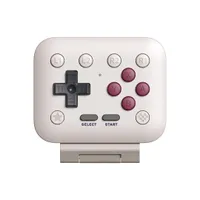
It's worth paying attention to the button layout here, though, to make sure it'll work for what you need. There's no analogue stick here, so this is very much a gamepad that aims at the NES, SNES, Game Boy, and Game Boy Advance catalogue principally, along with the many other consoles that predate analogue sticks.
It does have four function buttons at the top, two of which are the standard shoulder buttons and two of which are extra, giving you some nice customisation options. I found that Delta detected the layout perfectly, giving me the easy option to tweak my controls.

What Delta didn't do, though, was move the on-screen display of my game up to account for the controller taking up the bottom of the screen. It treated the FlipPad like a normal wired controller and centred my game screen, which actually made the FlipPad cut off the bottom of it. I fixed this by tweaking the app's settings to force the appearance of the touch button layout, which is slightly clumsy but still extremely effective.
That tiny teething problem aside, I've had nothing but positive experiences with the FlipPad, whether in how massively it upgrades the experience of playing GBA titles that involve quick button presses, or how tiny it is when stored in my tech pouch.
For retro gamers on the go, I think it's a no-brainer so long as it fits your phone, and it'll probably be a mainstay in my day pack for quite a while to come.
