I watched the England game on a mammoth screen for less than £200 all in – and you could do the same for the semis
All you need is a projector, screen and a garden for a festival-like viewing experience


Quick Summary
Watching the World Cup on a mighty projection screen needn't cost the Earth. Indeed, we managed it for under £200.
There are caveats, but the end result was very much worth it.
Some might bemoan the UK's summer heatwave but it presented a great opportunity to test some AV kit for me. After England dispatched Mexico in the FIFA World Cup last 16 I was determined to watch the quarter final in my garden, and without spending too much in the process.
The conditions were perfect for a projector – the match against Norway was to kick off at 10pm BST, so it would be dark outside, but the heatwave meant that the temperature would remain over 20-degrees Celsius. Cue cider, ice cream and quality football.
Sticking to a budget of around £200 meant I was limited to a 1080p projector, but that would be amble for the kind of scenario. I opted for the recently-launched Aurzen Roku TV Smart Projector (EAZZE D1R).
Usually priced at £199.99 on Amazon, you can actually get it with a massive discount right now. Tick the voucher code box on the listing and it's just £129.99 – a bargain as it turned out for me.
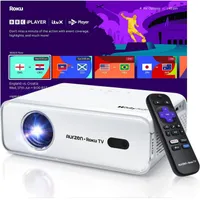
The Aurzen projector not only runs the full Roku streaming experience, which works smoothly over its dual-band Wi-Fi connection, it has auto focus and keystone functionality, so was a doddle to set up.
There's currently a World Cup football zone on the Roku front end too, so it was easy to find my match and launch the live stream (on ITVX, in this case).

Now the projection screen
The projector is capable of providing an image up to 150-inches diagonally, but I didn't want to go quite that large as I might also use the screen later indoors. So, with budget considerations in mind, I opted for a non-branded 100-inch portable screen and stand from Amazon.
I paid around £60 for it personally, although it has since gone up in price a touch. I'd keep an eye out for price drops though, as they happen regularly on these kinds of products.

I chose this particular screen as it comes with a carry bag, is easily storable, and also includes guide ropes, ground pegs and bags to fill with water to stabilise the feet. This proved a godsend as it was windy in the garden that night and I wouldn't hold out much hope of keeping the screen from sailing off over the neighbours' houses otherwise.
So if you are looking for an equivalent screen, do keep that in mind.
The set up
Setting up the screen in the garden was extremely simple – construct the poles, slide on the crease-free screen, fill the water bags, and peg it down using the guide ropes.
The screen I chose could be used with front or rear projection, as can the Aurzen, but I wanted to keep the projector to the front as I was using the built-in speakers for sound and as they are side firing, they were perfect for sitting just behind.
It's also worth noting that the size of the image projected depends on the distance of the projector itself, so you need plenty of room away from the screen to place it for a crisp 100-inch picture.

There is a zoom functionality, as well as manual keystone correction (both of which proved handy to get the picture just right), but you'll find yourself moving the projector back and forth during setup a fair bit.
One issue I had on that particular evening is that, with just 280 lumens brightness, the Aurzen Roku TV Smart Projector isn't that great in sunlight. In fact, I could barely see an image at all when the sun was shining. So I had to wait until sunset to set it up.
That only gave me about 15 minutes before kick off to get things just right, but when it clicked, it clicked.
The upsides and downsides
With the light completely gone, the projector and screen combo came into its own – with one minor change (which I'll come to in a bit).
While only 1080p with no HDR, the pictures provided were visually spectacular – deep and rich in colour, and popping in the fresh English countryside ambience. The white of the England shirts was stark and clean, while the reds of Norway's kit and green of the grass was vibrant yet without being overly saturated.
It certainly made for an excellent viewing experience (even though Norway scored first and gave us a bit of a scare).

The sound too worked well, even from the on-board speakers. Their placement was great for my family and I to hear the commentary and action clearly, yet didn't carry too far to bother our neighbours.
You can also link the projector to a separate Bluetooth sound system if you want beefier or surround sound, but it was perfect for us for the scenario.
The only real issue we had (bar the inability to see anything in daylight outdoors) was that running the match through ITVX added around a minute of latency. This is unlikely the projector or Roku system at fault, but the streaming service itself. And as we discovered, when you're watching a live, important match, you may hear spoilers emanating from other garden viewing parties.
Indeed, the Norway goal was greeted with loud groans in our area long before we got to see it.
It sent me rushing back into the house to grab my Sky Stream puck and controller, which I then connected via the HDMI port. Sky currently offers low latency streams of live World Cup matches when shown on either the BBC or ITV, on dedicated channels.
It fixed the issue for us, but that might not be an option for everyone, so is something to keep in mind.
Was it worth it?
And so, all told considering the entire set up (excluding bunting, LED lights and flowers, which my wife arranged to make things look more fun) cost less than £200, the evening's viewing experience elevated the World Cup for my family and I.
It helped that England won, of course, but it turned the watching experience into a more festival-like affair. Or maybe it was the cider.
Either way, this setup will be coming out more often in the future – Glastonbury viewings next year, for example. And I plan to host some nighttime garden movie screenings if the weather continues to hold out.
Considering all the apps – Netflix, Amazon Prime Video, Disney+, etc – are available on the Roku TV Smart Projector, there's certainly plenty of films to choose from.
The only sad part is that the rest of the World Cup – including England's semi-final against Argentina – are being screened in the UK's daylight hours, so my quarters experience will be impossible to replicate. Still, there's always the Euros in a couple of years time. C'mon England!
How to watch the World Cup from anywhere
And finally, just in case you'll be nowhere near your garden for the remaining World Cup matches, you could consider a VPN to stream the action live when on your travels.