Samsung UBD-K85004K Ultra HD Blu-ray player review
An aesthetically slick and affordable player to launch you into the world of 4K Ultra HD Blu-ray

-
+
Great 4K image quality
-
+
Curved design looks slick
-
+
Works great with Samsung setup
-
-
Doesn't feel premium
-
-
DMP-UB900 better all-round
Why you can trust T3 Our expert reviewers spend hours testing and comparing products and services so you can choose the best for you. Find out more about how we test.

If you are looking for a quick take-away from this review then this is it: if you have £600 to spend on an Ultra HD 4K Blu-ray player then the Samsung UBD-K85004K isn't for you.
No, if you have that money then you should go and buy the Panasonic DMP-UB900, which is by fine margins, the better and more versatile Ultra HD 4K Blu-ray player.

However, if you have either a curved 4K TV or about £400 to spend on Ultra HD 4K Blu-ray player (or both), then the Samsung UBD-K85004K is for you.

It is really that simple. The UBD-K85004K isn't quite as good as its Panasonic rival as an overall package, however it still delivers superb 4K picture quality and - crucially for some, no doubt - costs £200 less.

Ok, now onto the main review.
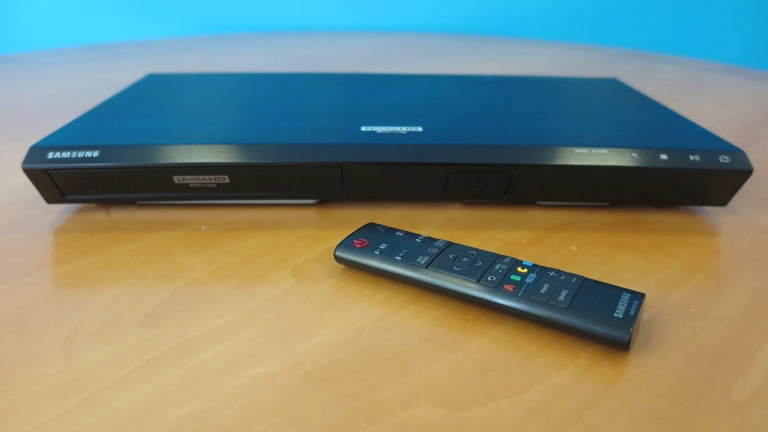
Out of the box the UBD-K85004K looks killer. Thin, curved and finished in a dark, gun-metal colour scheme, it looks high-tech and, considering you've just dropped around £400, reassuringly premium. It also slots in just lovely underneath a curved Samsung 4K TV, such as the curved UE55KS9000 we are using to test.

In the hand though it doesn't feel as good as it looks - this is largely a moot point however, as you hardly ever touch the system once installed.
Plugged in and powered up, the system delivers a slick menu interface, navigable by an equally slick controller that Panasonic can learn from in terms of design aesthetic and functionality.

Slot in a 4K Ultra HD Blu-ray disc, such as The Martian, and you are treated to not only a pleasingly rapid load, but also a really crisp, balanced and deep image. Yes, the quality of the K8500's images are top shelf, with a marked depth of three-dimensionality and colour gamut that is not delivered by lesser formats.
And, while we are speaking about other formats, this player can handle a lot of them. Blu-ray, 3D Blu-ray, DVD and CDs are all supported and, thanks to in-built 4K upscaling tech, most content looks better than it ever has before.

Away from physical disc media, the K8500 also offers decent network streaming and digital media file playback. Netflix and Amazon Instant Video apps are easily accessible and boot fast, while a selection of other entertainment and media platforms are accessible through Samsung Apps. Digital video and audio files can be played back via inserting a USB stick into the front-mounted, vanity plate covered, USB port.
Finally, in terms of connections, the rear of the K8500 is pretty minamilist, with a brace of HDMI ports sitting alongside an Ethernet port and optical digital out.

Overall then, the K8500 is a stylish and powerful 4K Ultra HD Blu-ray player that, through our time with the system, did little to let itself down. Right now, it also offers the most affordable entry into the 4K Ultra HD Blu-ray market.
If you have a curved 4K TV, specifically a Samsung, then you can add on half a star to the overall score, as the curved design and menu system sync up wonderfully with the company's other products (which also include a lovely curved soundbar). Regardless of the setup though, this player falls just below top marks as the build quality and video performance come in slightly lower than the, admittedly more expensive, Panasonic DMP-UB900.
